AI Tools for Small Business: Save Time & Stress
- Ubaid Rehman
- May 31, 2026
- AI Tools
- 0 Comments
Best AI Tools for Small Business: Simple Guide to Smarter Work
If you run a small business, you already know how much time small tasks take. Emails pile up. Social posts need planning. Customer questions need quick answers. Invoices need care. That is where AI tools for small business can help. I use AI as a helper, not as a full replacement for human work. The right tools can save hours, cut stress, and help a small team do more with less. In this article, I will explain the best AI software for common business needs, without using hard tech talk. I will also show how AI business automation can handle repeat tasks, while AI productivity tools can help you write, plan, sort, and serve customers faster. The goal is simple. You should know what to try, what to avoid, and how to pick tools that fit your budget and work style.
How AI Tools for Small Business Help Daily Work
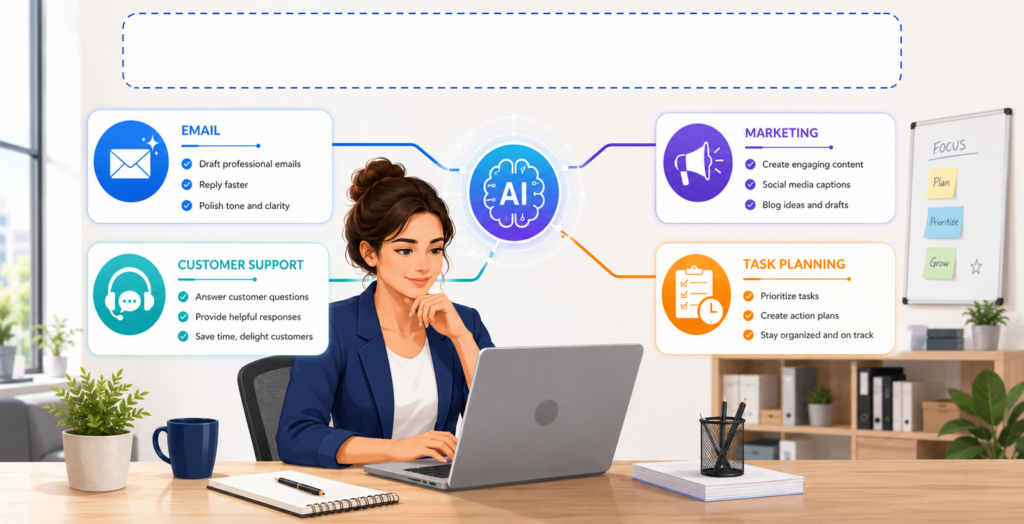
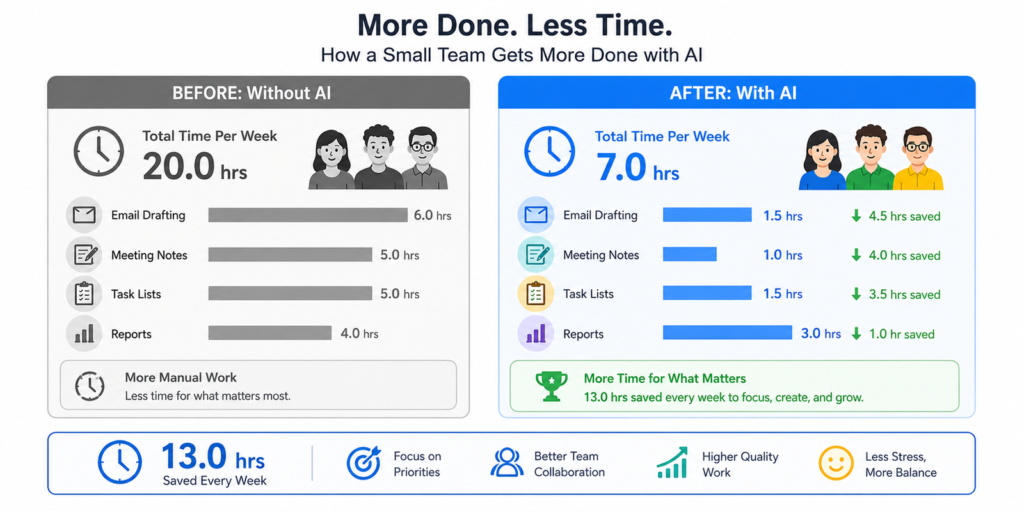
AI tools for small business help most when they remove repeat work from your day. For example, I once spent one hour each morning sorting emails, writing replies, and checking orders. After testing AI productivity tools, I save that time in half. That gave me more time to talk with customers and improve my offers. The best AI software does not need to feel hard or risky. It should solve one clear problem, such as writing product text, booking calls, creating reports, or answering common questions. Also, AI business automation works best when you start small. Pick one task that wastes time each week. Then test one tool for that task. If it saves time and keeps quality high, keep it. If it adds more work, move on.
Best AI Software Categories for Small Teams
Not every tool fits every company. So, I like to group AI tools for small business by job type. This makes the choice easier. Some tools help with writing and marketing. Some help with sales notes and customer care. Others help with cash flow, hiring, or reports. The best AI software should match a real task you already do. It should also fit your budget and skill level. If you need faster replies, test a support chatbot. If content takes too long, try a writing assistant. If you forget follow-ups, use AI business automation inside your CRM. Also, AI productivity tools can help you turn long notes into clear action lists. The table below gives a quick view.
| Business Need | Tool Type | Best Use | Good For |
|---|---|---|---|
| Writing and content | AI writing assistant | Emails, blogs, ads, product text | Owners, marketers, shops |
| Customer support | AI chatbot | FAQs, order help, lead capture | Service firms, stores, agencies |
| Sales work | AI CRM helper | Follow-ups, lead scoring, notes | Sales teams, consultants |
| Admin tasks | Workflow automation | Forms, alerts, data entry | Small teams with repeat tasks |
| Planning | AI task manager | To-do lists, summaries, meeting notes | Busy owners and managers |
AI Business Automation for Repetitive Tasks
AI business automation helps when a task follows the same steps each time. For example, a customer fills out a form. Then your team sends a reply, adds the contact to a list, and creates a task. AI tools for small business can help connect those steps. This saves time and reduces missed work. However, I do not suggest automating everything at once. Start with one small process, such as lead replies or appointment reminders. Then check the results each week. The best AI software for this job should work with tools you already use, such as email, calendars, forms, or your online store. Also, AI productivity tools can help turn call notes into tasks, so your team knows what to do next.
- Email replies: AI can draft replies for common questions. You should still review replies before sending them.
- Lead follow-ups: AI can remind you to contact warm leads. This helps you avoid lost sales.
- Order updates: AI can send status notes after a purchase. This lowers support requests.
- Meeting notes: AI can summarize calls and list next steps. This helps teams stay on track.
If you want a deeper guide on task flows, read my internal guide on how to automate small business tasks. It explains simple steps you can use before you buy any tool.
AI Productivity Tools for Writing, Planning, and Notes
AI productivity tools are often the easiest place to start. They help with tasks that many owners do each day. I use them to draft emails, clean up rough notes, and create simple plans. AI tools for small business can also help you write product pages, social captions, and short reports. Still, you should add your own voice before you publish anything. The best AI software gives you a strong first draft, but your examples make it feel real. Also, AI business automation can send those drafts to the right place, such as a task board or shared folder. This makes the full process faster. As a rule, use AI for the first draft, then use your judgment for the final version.
Best AI Software for Marketing and Content
Marketing takes time, even for a tiny shop. You may need blog ideas, email subject lines, ad text, and product details. AI tools for small business can help you plan and write faster. The best AI software for marketing should help with ideas, outlines, drafts, and edits. It should not create false claims or copy another brand. Also, AI productivity tools can help you turn one idea into many formats. For example, a blog post can become an email, three social posts, and a short video script. AI business automation can then schedule reminders or move content into your review process. This gives you a steady system without hiring a large team.
Content Ideas and SEO Support
When I plan content, I start with customer questions. Then I use AI tools for small business to group those questions into topics. This helps me write posts people may search for. The best AI software can suggest headings, title ideas, and simple outlines. However, I still check facts and search intent myself. AI productivity tools can make drafts cleaner, but they cannot know your customers like you do. Also, AI business automation can help store approved ideas in a content calendar. For safe SEO, write helpful answers, cite trusted sources, and avoid keyword stuffing. You can also review guidance from Google Search Central on helpful content.
AI Tools for Small Business Customer Support
Customer support is one of the best uses for AI tools for small business. Many customers ask the same questions about hours, shipping, prices, returns, or booking. A simple chatbot can answer those questions at any time. The best AI software for support should let you control the answers. It should also send hard questions to a person. This keeps service friendly and safe. AI business automation can tag support tickets, send order updates, and alert your team about urgent issues. Also, AI productivity tools can summarize long chats, so you can spot common problems. If ten people ask the same question each week, add that answer to your website.
AI Business Automation for Sales and Follow-Ups
Sales often come from good timing. If you forget to follow up, another company may get the sale. AI business automation can help by tracking leads and sending reminders. AI tools for small business can also help write short follow-up emails. This is useful after calls, quotes, or demo requests. The best AI software for sales should connect with your CRM or contact list. It should show who needs a reply and what happened last. Also, AI productivity tools can turn meeting notes into clear next steps. For example, after a call, AI can list the buyer’s needs, budget, deadline, and next action. You can then send a better reply in less time.
How to Choose the Best AI Software Without Wasting Money
It is easy to sign up for too many tools. I suggest testing AI tools for small business with a clear plan. First, write down the task you want to improve. Next, note how much time it takes now. Then test one tool for two weeks. The best AI software should save time, improve quality, or reduce stress. If it does none of these, cancel it. Also, check privacy settings before adding customer data. AI business automation can move data between apps, so you must know where that data goes. AI productivity tools should also be easy for your team to use. A tool is not worth much if no one opens it.
- Pick one pain point: Choose one task, such as email replies or meeting notes. Do not test five tools at once.
- Set a simple goal: Decide what success means. For example, save three hours per week.
- Check support and training: Good help pages matter. Your team should learn the tool without stress.
- Review data rules: Do not paste private customer data into a tool without reading its policy.
- Measure the result: Compare time, cost, and output after two weeks. Keep only what helps.
AI Productivity Tools and Data Safety Tips
AI productivity tools can save time, but you must use them with care. AI tools for small business often handle emails, files, chats, and customer notes. That means privacy matters. I avoid adding bank details, passwords, health data, or private client records into public AI tools. The best AI software should explain how it stores and uses data. It should also offer user controls, team roles, and clear settings. AI business automation should only connect apps that you trust. Also, train your staff with simple rules. Tell them what data they can share and what data must stay private. This small step can prevent serious issues later.
My Simple Starter Stack of AI Tools for Small Business
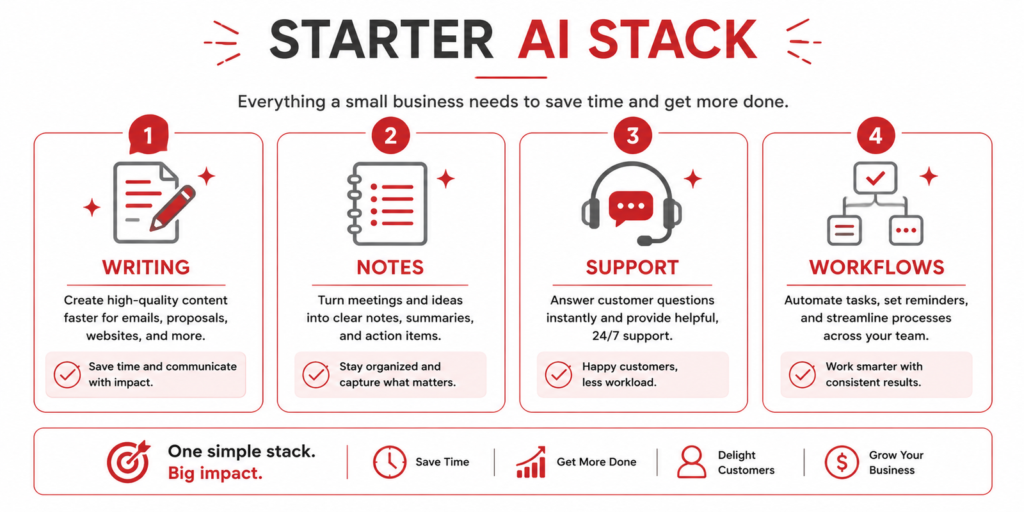
If I were starting from zero, I would not buy ten apps. I would build a simple stack of AI tools for small business around the tasks I do most. First, I would choose one writing assistant for emails and content. Next, I would choose one AI note tool for calls and meetings. Then I would add one automation tool for forms, emails, and task alerts. This gives a strong base without high cost. The best AI software stack is the one your team uses every week. AI productivity tools should feel helpful, not distracting. Also, AI business automation should run in the background and reduce manual work.
- Writing tool: Use it for first drafts, outlines, and edits. Always add your own voice before publishing.
- Meeting note tool: Use it to capture calls and action items. This helps you avoid missed details.
- Support chatbot: Use it for common customer questions. Keep a human handoff for harder issues.
- Workflow tool: Use it to connect forms, email, and tasks. Start with one workflow first.
Common Mistakes to Avoid with AI Business Automation
Many small business owners make the same mistake. They expect AI tools for small business to fix a broken process. But AI works best when your process is already clear. If your team does not know who handles leads, AI business automation may create more confusion. The best AI software can speed up good work, but it cannot replace clear rules. Also, AI productivity tools can make poor content look polished, yet still weak. So, check facts, review tone, and test every workflow. Another mistake is ignoring customers. If a chatbot gives cold answers, people may leave. Keep your support human, even when AI helps behind the scenes.
Conclusion: Pick AI Tools for Small Business That Solve Real Problems
AI tools for small business can help you save time, serve customers faster, and stay more organized. Still, the right choice depends on your real needs. Do not buy a tool because it sounds popular. Choose the best AI software for one clear task. Then test it, measure it, and keep it only if it helps. AI business automation works well for repeat steps, such as lead follow-ups, order updates, and task alerts. AI productivity tools are great for writing, planning, notes, and summaries. In my view, the smartest plan is simple. Start small, protect customer data, and keep human review in the process. That way, AI supports your business without taking away your voice.
FAQs About AI Tools for Small Business
What are the best AI tools for small business owners?
The best AI tools for small business owners are the ones that solve daily problems. For many owners, that means writing tools, meeting note tools, chatbots, and workflow tools. The best AI software should save time and feel easy to use. AI business automation helps with repeat tasks, such as follow-ups and reminders. AI productivity tools help with emails, summaries, plans, and content drafts.
Can AI business automation replace employees?
AI business automation should not replace good people. It should remove repeat work, so your team can focus on service, sales, and better ideas. AI tools for small business can handle drafts, reminders, sorting, and simple answers. However, people should still check quality and handle sensitive cases. The best AI software supports your team. AI productivity tools also help staff work faster without losing control.
Are AI productivity tools safe for customer data?
AI productivity tools can be safe if you use trusted products and set clear rules. Do not enter private customer data unless you know how the tool stores it. AI tools for small business should have clear privacy terms and account settings. The best AI software should offer access controls and data options. Also, AI business automation should connect only with apps your business trusts.
How much should I spend on the best AI software?
Your budget depends on your task load and team size. Many AI tools for small business offer free plans or low monthly plans. Start with one paid tool only if it saves time or improves results. The best AI software should pay for itself through saved hours or better service. AI business automation and AI productivity tools are worth keeping when they reduce real work each week.
How do I start using AI tools for small business?
Start with one task that wastes time every week. Then test AI tools for small business that solve that task. For example, try AI productivity tools for email drafts or meeting notes. If you need repeat steps done faster, try AI business automation. The best AI software should be simple, clear, and useful within the first few days. Measure results before adding more tools.