Cloud Computing Made Simple: Feel Safe Online
- Ubaid Rehman
- May 24, 2026
- Computer Networking
- 0 Comments
Introduction: cloud computing, online storage, internet technology, and data servers
When I explain cloud computing, I keep it simple. It means using the internet to save, open, and manage files or apps. Instead of keeping everything on one computer, you use online storage and remote data servers. These servers sit in safe buildings and run all day. Because of internet technology, your phone, laptop, or tablet can connect to them. For example, when I save a photo to Google Drive, I do not store it only on my phone. I store it on a cloud service. Then I can open it from another device. So, cloud use feels simple, even though strong systems work behind it.
Cloud computing in simple words
Cloud computing means renting computer power, apps, or space through the internet. You do not need to buy large machines for every task. Instead, you use online storage, apps, and tools from a cloud company. These companies run large data servers in secure places. Because of internet technology, you can use their systems from almost anywhere. For example, I can write a document on my laptop, then open it later on my phone. The file does not stay locked inside one device. It stays available through the cloud service. So, the cloud acts like a safe online room for your work and files.
How online storage works with cloud computing
Online storage is one of the easiest ways to understand cloud computing. When I upload a file, it travels through internet technology to data servers. The cloud service saves that file on those servers. Then, when I need the file again, I sign in and download or view it. This helps when a phone breaks, a laptop gets lost, or a hard drive fails. Also, many services keep more than one copy of a file. That helps protect data from simple hardware faults. So, online storage gives me peace of mind. It also saves space on my personal devices.
How internet technology connects your device to data servers
Internet technology works like the road between your device and data servers. When I open a cloud app, my device sends a request. Then the service checks my account and sends back the right data. This is how cloud computing lets me open emails, photos, videos, and files. The process often takes only seconds. Because of this, many people forget their data is not stored only on one device. Online storage makes access simple, but it still needs a stable connection. If the internet is slow, cloud apps may feel slow too. So, a good connection makes cloud services work better.
Types of cloud computing people use
There are several types of cloud computing, but the main idea stays the same. You use services through internet technology, instead of running everything alone. Some people only need online storage for photos and files. Small shops may use cloud tools for bills, stock, and customer records. Larger teams may rent full data servers for apps and websites. So, cloud use can be small or large. It depends on the need. The best part is that users can start small. Then they can add more space or power when work grows. This makes the cloud useful for many needs.
Public cloud computing
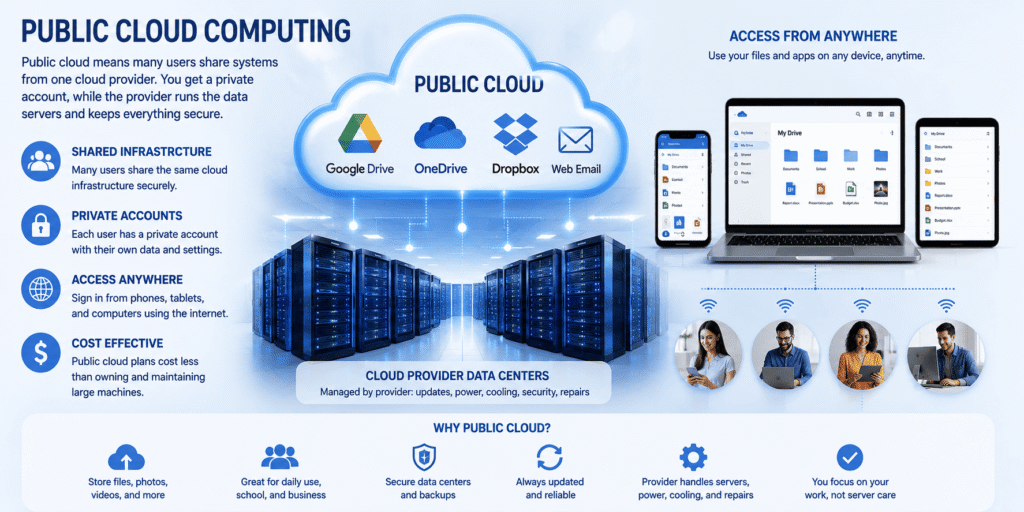
Public cloud computing means many users share systems from one cloud provider. Common examples include Google Drive, Microsoft OneDrive, Dropbox, and web email. Each user has a private account, but the provider manages the data servers. Because of internet technology, people can sign in from phones, tablets, and computers. Online storage in a public cloud works well for daily files, school work, photos, and simple backups. Also, public cloud plans often cost less than owning large machines. The provider handles updates, power, cooling, and repairs. So, users can focus on their work instead of server care.
Private cloud computing and data servers
Private cloud computing is built for one group, company, school, or office. It may run on owned data servers, or it may run with a trusted provider. This setup gives more control over users, files, and rules. Because of internet technology, staff can still connect from allowed places. Online storage in a private cloud can protect sensitive files better than a normal shared plan. For example, a clinic may use a private setup for patient records. A bank may also need strict access rules. So, private cloud systems fit groups that need more control and strong data care.
Hybrid cloud computing with online storage
Hybrid cloud computing mixes private systems with public cloud services. This setup helps when a group wants control and ease at the same time. For example, a company may keep private records on its own data servers. At the same time, it may use public online storage for training files or shared media. Because of internet technology, both parts can work together when set up well. This choice gives more freedom. It also helps teams handle busy times. So, a hybrid setup can be smart when needs change often, but some files still need extra care.
Why cloud computing helps at home and work
Cloud computing helps because it removes many daily limits. At home, I can save family photos in online storage and open them later. At work, teams can share files without passing USB drives around. Because of internet technology, people can work from different places and still use the same files. Cloud apps also reduce the need for local data servers in small offices. This can save space, time, and repair costs. Also, many cloud services update on their own. So, users get better tools without manual installs. In simple terms, the cloud makes access easier and safer.
Is cloud computing safe for online storage?
Cloud computing can be safe when users choose trusted services and use smart habits. Good providers protect data servers with locks, cameras, backup power, and security teams. They also use strong tools to guard data online. Still, users must do their part. Because of internet technology, weak passwords can put accounts at risk. So, I always suggest strong passwords and two-step sign-in. Online storage should also be checked often. Remove old files when you no longer need them. Share links only with people you trust. In short, cloud safety depends on both the provider and the user.
Cloud computing vs old data servers: simple table
Many people ask if cloud computing is better than old local data servers. The answer depends on cost, control, and use. With old servers, a person or company buys machines and keeps them nearby. With cloud services, they rent space and tools through internet technology. Online storage also makes file access easier from many devices. However, local systems may suit some groups with strict needs. So, it helps to compare both options in plain words. The table below shows the main differences. It can help you choose the right setup for home, study, or work.
| Feature | Cloud setup | Old local server setup |
|---|---|---|
| Cost | You usually pay monthly or yearly. | You buy hardware and pay for care. |
| Access | You can sign in from many devices. | You may need office access or setup. |
| Storage growth | You can add more space when needed. | You may need to buy more drives. |
| Repairs | The provider handles most repair work. | Your team handles repair and upkeep. |
| Best use | Files, apps, backups, websites, and teams. | Private tasks with full local control. |
Common uses of internet technology
Internet technology makes many daily cloud tasks possible. When I stream a song, save a photo, or join a video call, I use cloud computing. The service often stores files or runs apps on data servers. Then it sends the result to my device. Online storage is also used in phone backups, school portals, work tools, and website hosting. Because of this, cloud use is not rare. Most people use it every day without naming it. For example, email inboxes often live in the cloud. So do shared notes, chat files, and many mobile app backups.
- Photo backup: Cloud apps can save phone photos to online space. This helps when a phone is lost or damaged.
- Email access: Web email lets you read messages from many devices. Your inbox stays on remote systems.
- Team files: Shared folders help teams work on the same files. This reduces copies and confusion.
- Website hosting: Many websites run on rented cloud systems. This helps site owners avoid buying large machines.
How to choose a good cloud computing service
Choosing a cloud computing service should not feel hard. First, check how much online storage you need today. Then think about how much you may need later. Also, check the service rules, backup options, and account safety tools. Because of internet technology, your account may be used from many places. So, two-step sign-in matters. If you run a business, ask where the data servers are located. Also, check support, uptime history, and pricing. Do not choose only the cheapest plan. Pick the service that matches your files, budget, and need for trust.
- Check storage space: Make sure the plan has enough room for your files. Also, leave space for future growth.
- Review security tools: Choose a service with two-step sign-in and file sharing controls. These features protect your account.
- Read pricing rules: Some plans charge for extra space or data use. Read the plan details before you pay.
- Test ease of use: A good service should feel simple. If it confuses you, try another trusted option.
Mistakes to avoid with cloud computing and online storage
Cloud computing is useful, but simple mistakes can cause trouble. Many people upload files to online storage and never check sharing settings. As a result, private files may reach the wrong people. Some users also keep weak passwords or reuse the same password everywhere. Because of internet technology, one stolen password can harm many accounts. Another mistake is storing files without backups. Cloud services are strong, but no system is perfect. So, I keep a second copy of key files. I also check trusted data servers and service rules before I store important work.
Conclusion: cloud computing makes online storage easier
Cloud computing is simple when you think of it as using someone else’s secure computers through the internet. It helps you save files, run apps, and access work from many devices. Online storage is the part most people notice first. Yet internet technology and data servers do the hard work behind the screen. For daily users, the cloud can save time and protect files. For businesses, it can reduce hardware needs and support growth. Still, smart habits matter. Use strong passwords, check sharing settings, and keep backups. If you do that, cloud services can be a safe and useful choice.
What is cloud computing in one sentence?
Cloud computing means using the internet to store files, run apps, or rent computer power from remote servers. You do not need to keep everything on your own device. Instead, a trusted service manages the systems, and you sign in when needed.
Is cloud computing the same as online storage?
Online storage is one part of cloud computing, but they are not exactly the same. Online storage mainly means saving files on remote servers. Cloud computing can also include apps, websites, databases, backups, and rented computer power for many tasks.
Is cloud computing the same as online storage?
You may not need it for every task, but it helps with backups, photos, documents, and device changes. If your phone breaks, files saved in the cloud can still be safe. It also helps when you use more than one device.
Can cloud computing work without the internet?
Most cloud services need the internet because your device must connect to remote servers. Some apps let you work offline for a short time. Then they sync changes when your internet connection returns. Still, the main cloud features need online access.
Is cloud computing safe for photos and documents?
It can be safe if you use a trusted provider and protect your account. Use strong passwords, two-step sign-in, and careful sharing settings. Also, keep a second copy of important files. This gives you more safety if anything goes wrong.
What are examples of cloud computing?
Common examples include Google Drive, iCloud, OneDrive, Dropbox, Gmail, Zoom, Netflix, and many website hosting services. These tools use remote servers and internet access. You may use cloud services every day without thinking about the name.
Bookmark this page now so you can return whenever you need a simple cloud computing guide. Learn networking if you want to expend your skills how the cloud computing work.